


Free Checklist
A step-by-step system for offering AI SEO as a service to any client — with prompts, tools, and Clicks.so integration.

Run a quick audit with a Clicks.so free trial to find the biggest problems before you start fixing things. You're looking for missing meta titles, broken links, slow load speeds, and pages with no real content.

♛ Pro Tip
Don't try to fix everything at once. Identify the top 3–5 issues that will have the biggest impact and prioritize those.
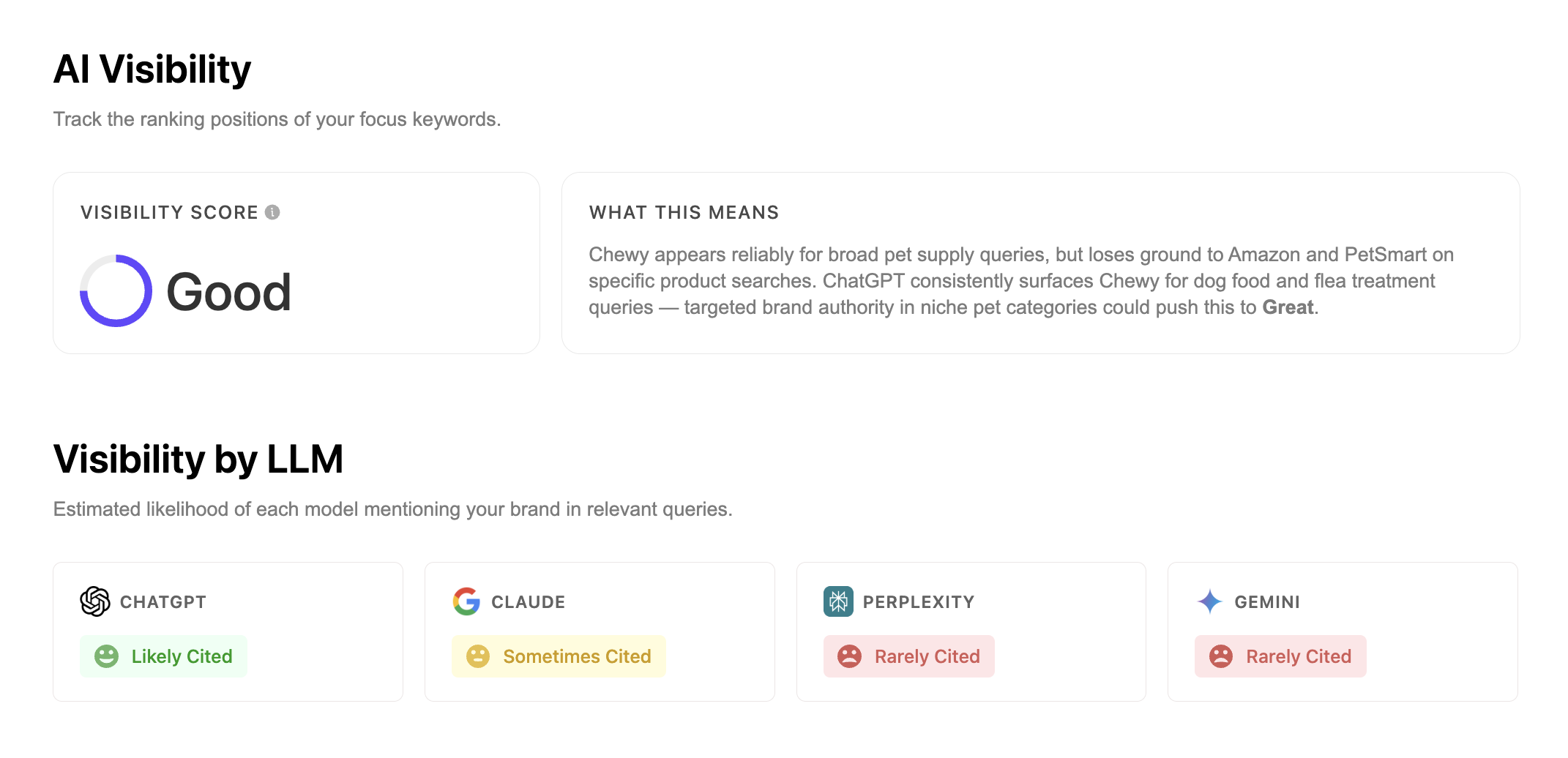
This tool anayses your visibility and citabiliety across different LLMs like ChatGTP, Claude, Perplexity and Gemini.
♛ Pro Tip
This audit tool provides personalized tasks and reocmmendations based on impact. Do the high-impact tasks first to see faster results.
➤ How To Do This In Clicks.so
Go to Dashboard → Openor add a project → Click "Visibility Report" on left toolbar → Follow the recommendations provided by Clicks
Before touching any content, you need to know exactly what your client wants to rank for. Aim for 1 primary keyword (their main money term) and 3–5 secondary keywords (related phrases people also search) per page.
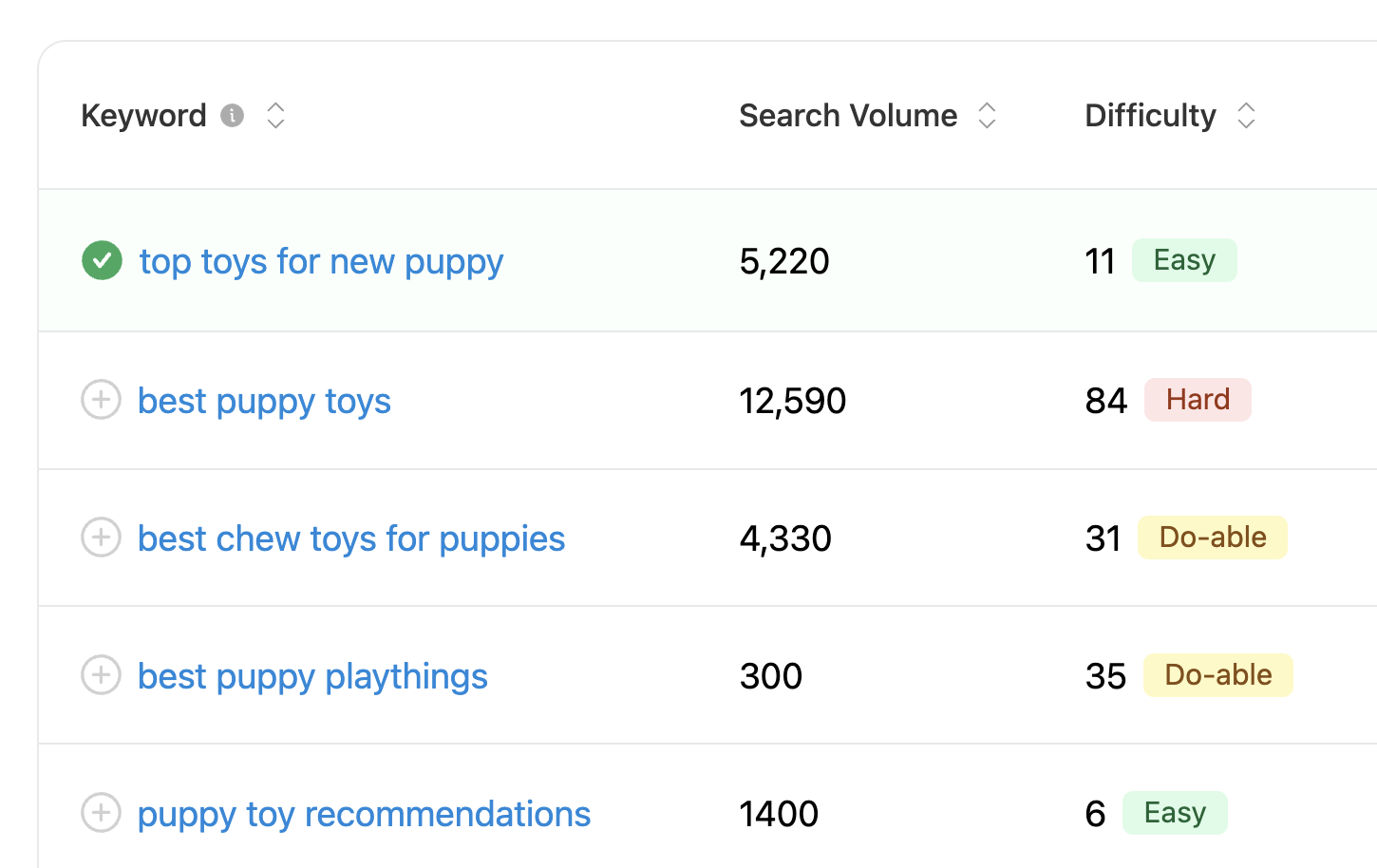
Use the Clicks.so keyword research tool 👆 and use this AI prompt to assist you:
You are an SEO expert. My client is a [business type / industry]. Their main services or products are [list services or products]. Their target audience is [describe audience — e.g. small business owners, homeowners, e-commerce brands, etc.].Suggest 1 primary keyword and 5 secondary keywords they should target. For each keyword, explain the search intent (are people looking to buy, looking for info, or comparing options?).
.svg)
Prompt variations can be endless. So just add a few basic prompts to your tracker to give you a general idea of performance. If you don't know what prompts to add, Clicks will suggest some for you.
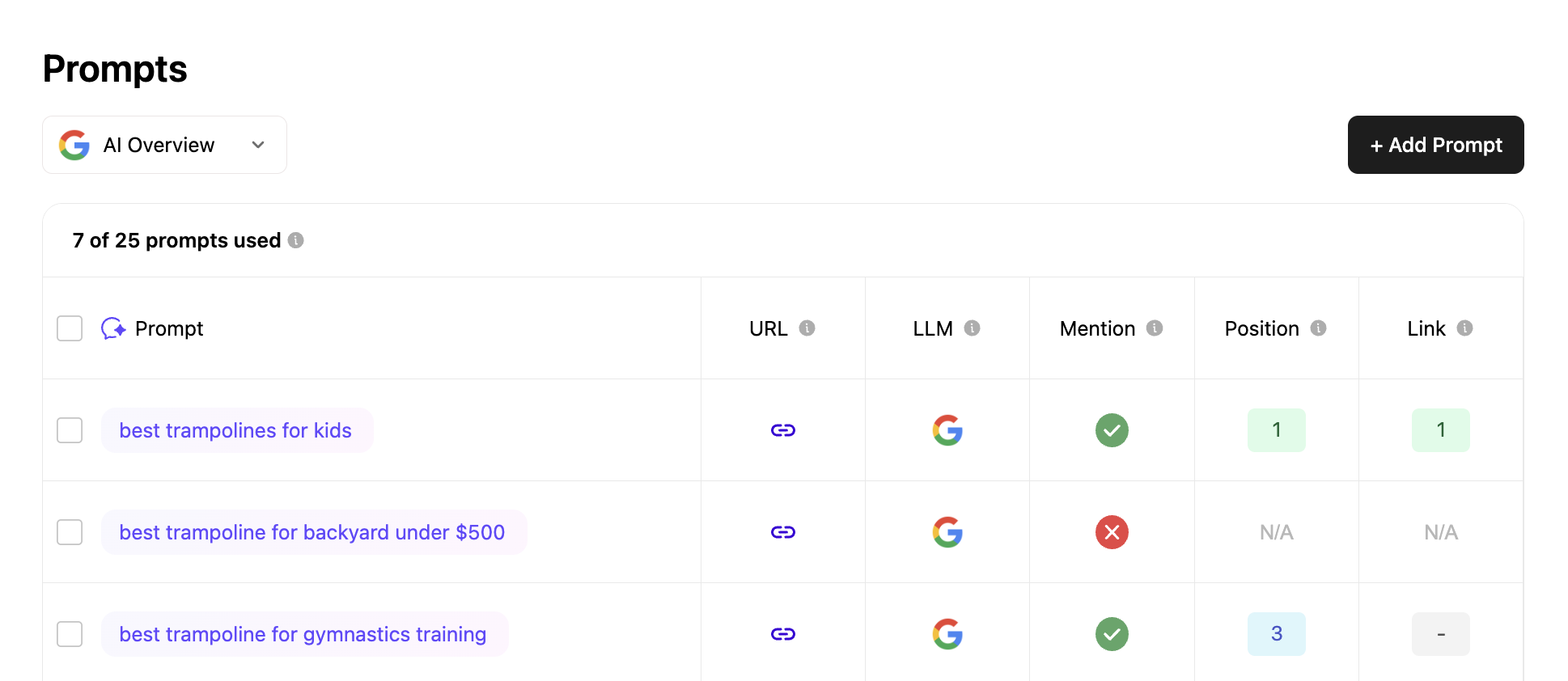
Check Clicks.so for your top competitors. These are the sites you need to beat. Look at their page titles, content length, and what topics they cover. The use this prompt in Claude to get further guidance:

My client is a [business type] in [city] targeting the keyword "[primary keyword]". Look at this competitor's page: [paste competitor URL or describe their content]. What SEO elements are they doing well? What gaps or weaknesses do you see that my client could exploit to outrank them?
♛ Pro Tip
Pay attention to how many words are on their page, whether they have FAQs, and how specific their content is to the local area.
Log into Clicks.so and add your client's website as a new project. This sets up the tracking infrastructure so everything you do next gets measured automatically.
➤ How To Do This In Clicks.so
Go to Dashboard → Add New Site → Enter the client's domain → Follow the setup wizard to connect their site.
Once connected, take note of three key numbers in Clicks.so: their current organic traffic estimate, their Site Score (overall SEO health), and their AI Visibility Score (how often AI tools like ChatGPT and Perplexity reference them). These are your 'before' numbers.
♛ Pro Tip
The AI Visibility Score is a powerful selling point — most clients have never thought about whether AI tools recommend their business. A low score = a big opportunity.
➤ How To Do This In Clicks.so
Open the site dashboard and screenshot or write down: Traffic volume, Site Score out of 100, and AI Visibility Score. You'll compare these numbers after optimization.


Every page needs a unique title tag (50–60 characters) that includes the target keyword, and a meta description (150–160 characters) that makes people want to click. These show up directly in Google search results.
*Clicks.so will write these for you based on your content and keywords.
Each page should have exactly one H1 tag that includes the main keyword. Supporting sections get H2 tags. Details within those sections get H3s. This helps Google and AI crawlers understand the structure of the page.
✦ Opportunity
Pages with between 7-20 sub-headings are more likely to be mentioned by AI models. The prompt below will help you expand your content to include more optimized sub-headings.
Every image on the site should have descriptive alt text that tells Google (and screen readers) what the image shows. This is one of the most overlooked quick wins in SEO.
I need alt text for images on a [business type] website in [city]. The primary keyword is "[keyword]".Write alt text for these images:1. Hero/banner image of the business2. Team photo3. Before/after or service result photo4. Business location / storefront photoKeep each under 125 characters. Make them descriptive and include the keyword naturally where it fits — don't force it on every image.
♛ Pro Tip
Don't stuff keywords into every alt tag — it looks spammy to Google. Describe the image first, keyword second.
Internal links connect pages on the same website to each other. This helps Google discover pages and signals which pages are most important. Link from blog posts or other pages back to key service pages.
Here is a list of pages on my client's website: [list pages and their topics].Their primary keyword is "[keyword]" and their most important page is [page name/URL].Suggest 5 internal linking opportunities. For each one, tell me: which page should link to which, what anchor text to use, and where in the content the link should be placed.
♛ Pro Tip
A simple rule: every page should link to at least one other page on the site, and the homepage or main services page should be linked from several places.
Take the existing homepage and main services or product page copy and improve it using AI. The goal is clear, keyword-rich, benefit-focused copy that speaks directly to what the customer needs — structured in a way that both humans and AI models can easily understand. Research shows that pages with 7–20 sub-headings are significantly more likely to be cited by AI tools like ChatGPT and Perplexity. This means your heading structure isn't just good SEO — it's your ticket to AI visibility.
Rewrite the following web page copy for a [business type / industry]. Primary keyword to include naturally: [keyword]Secondary keywords to weave in: [list them]Target customer: [describe who they are — e.g. small business owners, busy parents, e-commerce brands]Tone: [friendly / professional / urgent]Current copy: [paste existing copy here]Requirements:- Structure the page with between 7 and 20 sub-headings (H2s and H3s) — this is critical for AI visibility- Each sub-heading should be clear and descriptive, not clever or vague- Keep paragraphs short (2–4 sentences max) under each heading- Lead with the customer's problem, not the business's story- Include the primary keyword in the first 100 words and naturally in 2–3 sub-headings- End with a clear call to action under its own heading- Do not keyword-stuff — write for humans first, structure for AI second.
♛ Pro Tip
Pages with 7–20 sub-headings are more likely to be mentioned by AI models like ChatGPT, Gemini, and Perplexity. This is one of the easiest ways to improve a client's AI Visibility Score in Clicks.so — just restructure the page with more descriptive headings. Always edit the AI output before publishing and add the client's real details.
FAQ sections are powerful for SEO because they directly match how people search (questions) and can show up as 'People Also Ask' boxes in Google. Add 5–8 FAQs to the homepage and main service or product pages.
Create an FAQ section for a [business type / industry] targeting the keyword "[keyword]".Write 6 questions and answers. Requirements:- Questions should match real things people search for (use question keywords like 'how much', 'do you', 'what is', 'how long', 'is it worth')- Each answer should be 2–4 sentences — concise and direct- Include the primary keyword in at least 2 answers naturally- Cover topics like: pricing, process, timeline, results, why choose them, and common objections
✦ Opportunity
These FAQs can also be marked up with FAQ Schema, which makes Google more likely to display them as rich results. Use a free schema generator to add this to the page.
Generic copy doesn't convert and doesn't rank. You need to weave in language that speaks directly to the client's specific industry, audience, and use case — so Google (and potential customers) immediately understand who this business is for.
My client is a [business type / industry]. Their ideal customer is [describe target audience — e.g. e-commerce store owners, wedding photographers, B2B SaaS companies, homeowners, etc.].Rewrite or enhance this section of their website to speak more directly to that audience: [paste section of copy].Include:- Industry-specific language and terminology their audience actually uses- Pain points and goals specific to this type of customer- Any trust signals relevant to this niche (e.g. certifications, integrations, results)- Keep it natural — write like you understand their world, not like you're trying to tick boxes
♛ Pro Tip
If the client serves multiple distinct audiences (e.g. both individuals and businesses), consider creating separate pages tailored to each. This dramatically improves relevance and rankings for both segments.
Page speed is a direct Google ranking factor. Run the site through PageSpeed Insights and fix the top issues. Common culprits: uncompressed images, too many plugins/scripts, and no caching.
♛ Pro Tip
Aim for a score above 70 on mobile. The biggest quick win is usually compressing images — this alone can dramatically improve load time.
Google uses mobile-first indexing, meaning it crawls and ranks the mobile version of your site first. Test every page on a real phone and in Google's mobile testing tool to make sure nothing is broken.
♛ Pro Tip
Check that text is readable without zooming, buttons are large enough to tap, and forms work on mobile. A site that looks fine on desktop can be broken on mobile.
A sitemap tells Google what pages exist on the site. Submitting or updating it in Google Search Console ensures Google knows about all your new and improved pages as quickly as possible.
♛ Pro Tip
Most website platforms (Webflow, WordPress, Squarespace) auto-generate a sitemap at yourdomain.com/sitemap.xml. In Search Console, go to Sitemaps → enter the URL → Submit.
Add the client's primary and secondary keywords to Clicks.so so you can track exactly where they rank in Google over time. This is what turns your work into proof.
♛ Pro Tip
Add all the keywords from Phase 1 — primary and secondary. Rankings often shift in the first few weeks, so don't panic if things move around before settling.
Connecting GSC gives you real traffic data — actual clicks, impressions, and which search queries are bringing people to the site. This is much more accurate than estimates.
➤ How To Do This In Clicks.so
In Clicks.so: Go to Integrations → Google Search Console → Connect Account → Select the client's property. Once connected, you'll see real GSC data pulled directly into your Clicks.so dashboard.
Backlinks — other websites linking to your client's site — are one of the strongest ranking signals Google uses. This is ongoing work because one batch of links won't cut it. The goal is a steady, natural-looking stream of quality links every month. Focus on relevance over volume: one link from a respected industry site is worth more than ten from random directories.
My client runs a [business type / industry] website at [domain]. Their primary keyword is "[keyword]" and their target audience is [describe audience].Suggest 10 specific backlink opportunities for this type of business. For each one include:1. The type of site or publication to target (be specific — e.g. "SaaS review sites like G2 or Capterra" not just "review sites")2. The strategy to get the link (e.g. guest post, directory listing, resource page, podcast feature, HARO, etc.)3. Why this link would be valuable for SEOPrioritize opportunities that are realistic for a small business to actually land without a huge outreach budget.
♛ Pro Tip
The easiest quick wins are: (1) free directory listings like Clutch, DesignRush, or industry-specific directories, (2) getting listed as a guest on podcasts in their niche, and (3) writing guest posts for blogs their audience already reads. Aim for 3–5 new quality links per month.
Fresh content signals to Google that the site is active and authoritative. One well-optimized blog post per month targeting a secondary keyword or a question your audience is searching for is enough to compound results over time. Each post is a new opportunity to rank, get shared, and attract backlinks.
Write an outline for an SEO-optimized blog post for a [business type / industry] website.Target keyword for this post: [keyword or question — e.g. "how to choose a web designer"]Target audience: [describe who they are]Goal of the post: [inform / convert / build trust]The outline should include:- A compelling title that includes the keyword- An intro hook (what problem does this solve for the reader?)- 6–10 H2 sub-headings that cover the topic thoroughly- H3s under relevant sections where needed- A conclusion with a clear call to action- Suggested internal links to existing pages on the siteThen write the full blog post based on this outline. Aim for 800–1200 words. Keep paragraphs short, use the keyword naturally, and write in a [tone] voice.
♛ Pro Tip
Repurpose each blog post after publishing: turn it into a LinkedIn post, a short video script for YouTube or TikTok, or a thread. This multiplies the value of the content and can generate additional backlinks.
Pages that ranked well can drop over time if the content goes stale. Every month, identify 1–2 older pages that have lost rankings or traffic and update them — add new information, improve the headings, expand thin sections, and make sure all links still work. Google rewards freshness, especially for competitive keywords.
I have an existing page on a [business type / industry] website that has lost rankings over time. The page targets the keyword "[keyword]".Here is the current content: [paste existing page content]Please:1. Identify what's likely causing the ranking drop (thin content, poor structure, missing topics, outdated info, etc.)2. Suggest specific improvements to bring this page up to current SEO standards3. Rewrite any weak sections with stronger, more detailed content4. Add 2–3 new H2 sections covering angles the current page misses5. Ensure the final page has between 7 and 20 sub-headings total for maximum AI visibility
♛ Pro Tip
Check Google Search Console monthly to find pages where impressions are high but clicks are low — these are ranking but not compelling enough to click. Improving the title, meta description, and intro of these pages can deliver quick traffic wins without creating anything new.
At the end of each month, open Clicks.so and compare current Traffic, Site Score, and AI Visibility Score against the baseline from Phase 2. Look at which keywords moved, which pages gained or lost traffic, and where the biggest opportunities are for next month. This is how you stay proactive instead of reactive.
♛ Pro Tip
Share a quick 3-bullet summary with your client each month: what improved, what you're working on, and what the plan is for next month. Clients who feel informed are clients who stay.
➤ How To Do This In Clicks.so
Open the client dashboard → Compare current scores to the baseline screenshot from Phase 2 → Check keyword ranking movement → Identify pages with drops → Use this data to decide where to focus next month's blog post and refresh efforts.


.svg)
